Where I left off
Quick recap for anyone just landing on this. I’m rebuilding the missing half of Fury, a game whose servers were switched off in 2008. I have the “client”, including graphics, menus, sounds. I don’t have the “server”, the machine at the company’s end that handled logging in and matchmaking. That’s gone. The project is to rebuild it from scratch, using the client as the only clue for how it’s meant to work.
Last post I ran a batch of small experiments on the client. Two results matter here. One, the game will happily run a whole gameplay screen with no server anywhere. Two, the “just type a magic word to start your own server” trick my plan was leaning on doesn’t exist in this copy. The studio welded those doors shut before they shipped it.
So now I’m at the part I actually care about. Before I can rebuild the login server, I need to know what the client expects to hear from one. And the cleanest way to find that out is to let the client try to connect, and secretly write down everything it says.
What I tried
Here’s the idea in plain terms.
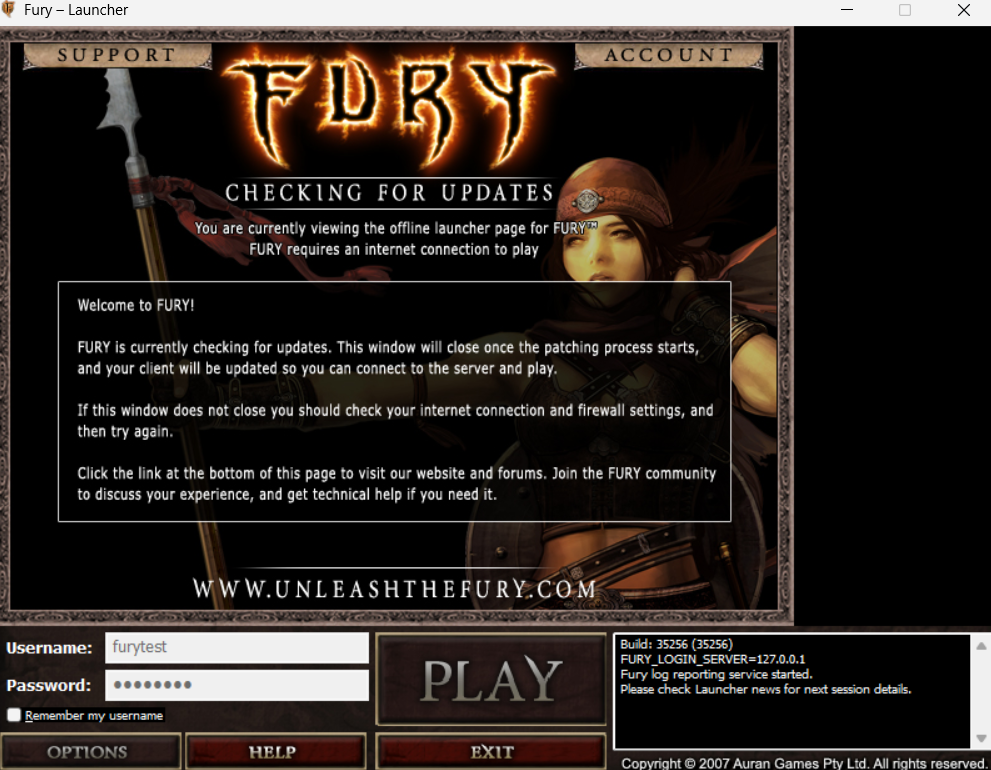
When you launch Fury normally, a small program called the launcher runs first. Its job is to work out which login server to talk to, log you in, and then hand the actual game a startup line telling it where to go. That launcher is where the network conversation begins.
Here’s the plan:
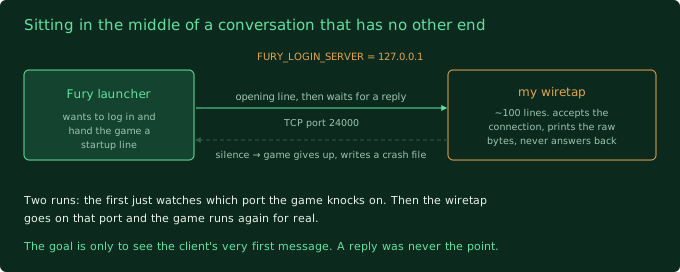
- Tell the game the login server is my own PC. The launcher checks a few
“environment variables” when it starts. Those are just named settings the
operating system hands to a program when it runs. One of them,
FURY_LOGIN_SERVER, overrides the login server address. I set it to127.0.0.1, which is the universal “this same computer” address. Now the game will try to log in by talking to me. - Put nothing there but a wiretap. I wrote a tiny program, about a hundred lines, that does one thing. It accepts a network connection and prints the raw bytes it receives. It never answers back. It’s a listening device, not a server.
- Launch the game and watch. The game connects to my wiretap expecting a real login server, says its opening line, and my program writes that line down. The game waits for a reply, gets nothing, gives up. Fine. I already got the thing I wanted.
The reason this is worth a whole post: I didn’t know what that opening line would
look like. It could be readable text. It could be a wall of binary I’d have to
decode by hand. It could be scrambled from the very first byte, in which case I
have a much harder road ahead. There were hints pointing at that last one, an
old encryption library sitting in the game’s folder and a folder literally called
trusted with a security certificate in it. But a hint isn’t an answer.
First I had to find the right door
Small snag before any of that. FURY_LOGIN_SERVER sets the address to my PC,
but not the port.
A port is like an apartment number. The address gets you to the building. The port number gets you to the specific door where one particular program is listening. My wiretap has to be sitting on the exact same port the game is going to knock on, or they never meet, and I didn’t know that number.
So this was a two-step test. First run just watches which door the game knocks on. Then I put the wiretap on that door and run it again for real.
The first run answered it in about a second. The game reached out to my PC on port 24000 and then sat there waiting, because nothing was listening yet. So that’s the door.
[SIDE NOTE] the launcher also quietly fired off a second connection, over plain
web traffic, to the real login.unleashthefury.com. That domain has been dead
since 2008, right? Except it still resolves, to a live server, that answered. I
don’t know what’s there or who put it there. Probably a leftover “any news for
the launcher?” check. I’ve written it down to chase properly later, it’s not what
this test is about, but, huh….
What broke (or what I didn’t expect)
Nothing broke, exactly. I got a clean answer on the first proper run. It’s just not the easy answer.
I put the wiretap on port 24000, launched the game, and this is the first thing Fury said:
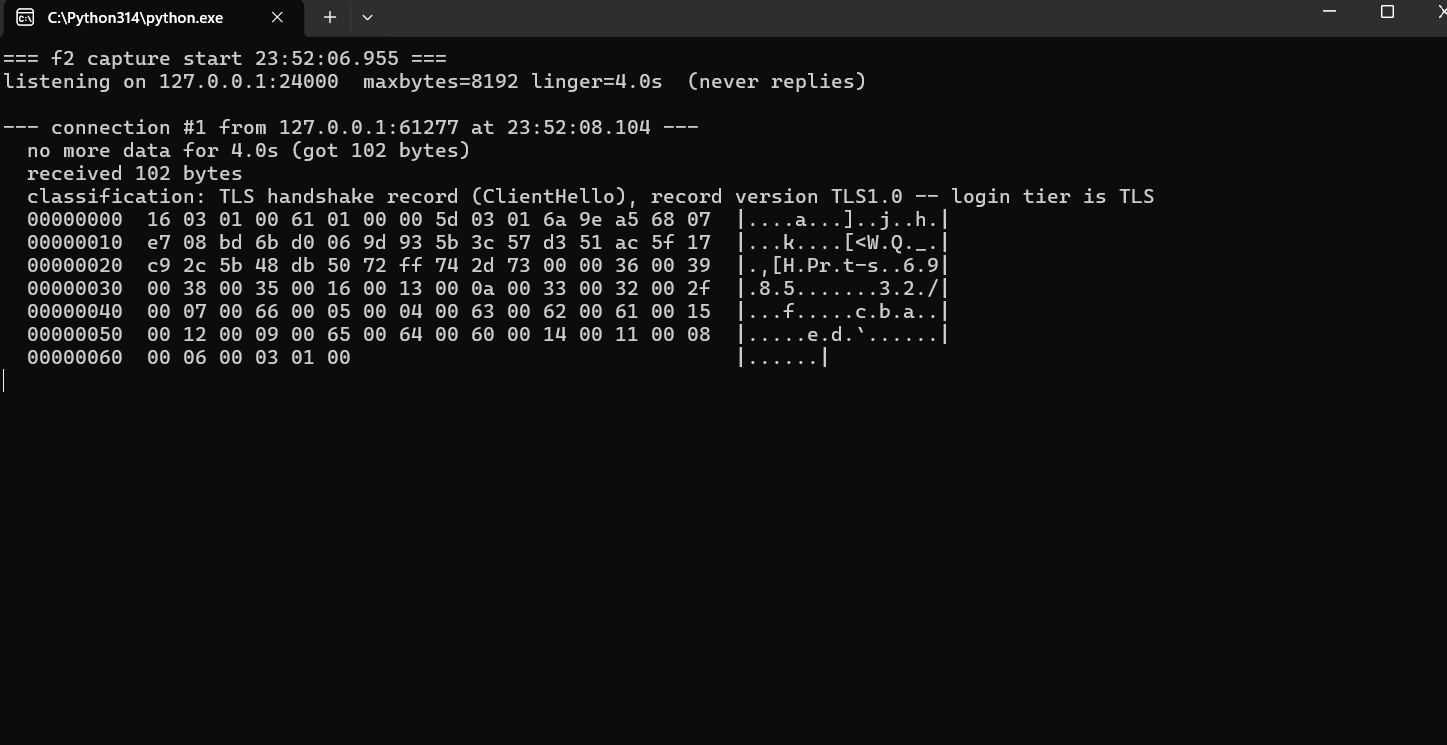
That first byte, 16, and the 03 01 right after it, are a dead giveaway. This
is TLS. TLS is the thing the little padlock in your browser means. It’s how
two computers agree on a shared secret and then talk in a code only they can
read. The “s” in “https”.
So the login server doesn’t speak any readable language I can just watch and learn. The moment the connection opens, the client goes straight into “let’s set up encryption” mode. What I caught is the client’s opening move in that negotiation, called a ClientHello: it’s the client saying “hi, here’s who I am, here’s the timestamp, and here’s every secret-code style I know how to speak, pick one”.
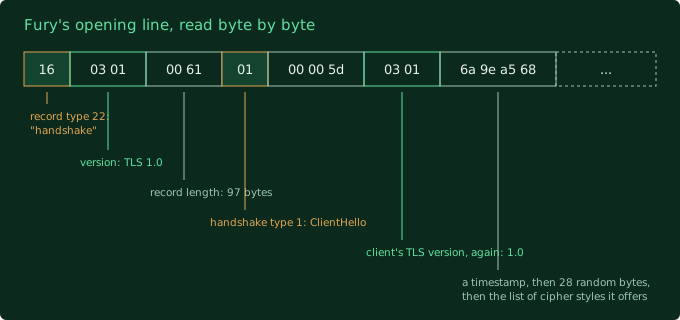
I can even read the age off it. The list of code styles it offers is a very 2007 list. A pile of them are ciphers that were considered fine then and are considered broken now, including some deliberately-weak “export” ones from the era when the US government restricted strong encryption. And it offers zero of the modern extras a browser would tack on today. This is an old encryption library doing exactly what it did in 2007, untouched.
The connection then died, because my wiretap just sat there like a brick instead of doing the encryption dance back. The game wrote a crash file and bailed, which from last post I know is just its standard panic reflex, not a real problem.
What I learned
- The login server is encrypted, from the very first byte. There’s no plaintext handshake to watch. To rebuild login I’ll have to stand up my own encryption endpoint with its own certificate, and only then do I get to see the actual login conversation, which is still a total unknown behind that wall.
- But it’s standard encryption, not a custom scramble. That’s the good news hiding in the bad news. It’s bog-standard TLS, the same protocol as every website, just an old version of it. I was bracing for some bespoke Auran in-house obfuscation. It’s not that. Standard means I have standard tools.
- My override works, and it’s enough on its own.
FURY_LOGIN_SERVERplus the username and password ones are all live. I can aim the launcher at a login server I control without editing a single game file. One less thing to fake. - The port is 24000. Small thing, but I’d had a question mark next to that number in my notes for weeks. Now it’s a fact.
The thing I still don’t know, and it matters a lot: when I put up my own
encryption endpoint with a homemade certificate, will the client accept it, or
will it check that certificate against the one in that trusted folder and
refuse? If it checks, that’s a whole extra wall. That’s the next question about
this tier, but not the next thing I’m doing.
Next up
Because there’s a shortcut I still haven’t tried, and it’s the big one.
The launcher’s whole job is to log you in and then hand the game a startup line with the results baked in. If I write that startup line by hand, with a fake “which server do I talk to” address pointing at something small I control, and aim it at a match hosted on my own PC, does a player get into a real fight with this entire scary encrypted login layer skipped completely?
If that works, everything in this post becomes a problem for future me, or for nobody. If it doesn’t, I’m buying a disassembler and learning to read compiled code. That’s the next post, and it’s the one the whole project has been walking toward.